Research · Digital collaboration · System design
Optimising the Use of Microsoft Teams in Undergraduate Education
I investigated how Microsoft Teams and its integrated tools could support undergraduate communication, collaboration, productivity and engagement. I combined student evidence with an observed engineering project to develop a more structured model for module delivery and group work.
- My role
- Independent Researcher & Author
- Project
- Final-Year Dissertation
- Year
- 2026 · Academic year 2025–2026
- Tools explored
- Microsoft Teams · Word · PowerPoint · OneNote · Planner · Excel · Whiteboard
- Methods
- Literature review · Questionnaire · Semi-structured interviews · Direct observation · Descriptive statistics · Thematic analysis
- Questionnaire
- 63 responses across different academic levels and disciplines.
- Interviews
- 5 semi-structured interviews with engineering project participants.
- Observation
- One six-member glider project, including me as a participant and researcher.
- Research outcome
- Proposed integrated Teams model and implementation recommendations, informed by quantitative and qualitative evidence.
The research at a glance
Teams offered a broad, integrated toolset, but much of it remained underused while everyday communication continued across other platforms. This evidence informed a proposed integrated Teams model to make better use of existing capabilities and reduce fragmented academic workflows.
The model was a research proposal. It was not evaluated over a sustained period in a live module, so improvements in learning or productivity were not demonstrated.
Film text & description
Optimising Microsoft Teams — Kinon A. Southerton Jones. Teams was already part of university life, but quick conversations often moved elsewhere. The research included 63 questionnaire responses, five interviews and an observed six-member project including the researcher. 36 of 54 answers reported no formal Teams training. Implementation, familiarity and guidance mattered. The proposed model uses one Team per module, with General for lecturers and all students and private channels for project groups. A guided homepage tour leads into Class Notebook, assignment creation, the attached brief, student view and assessment rubric. Later views show Reflect, announcements, resources, shared reports and presentations, Planner, minutes, Whiteboard, risks and chat. One connected academic workspace. A proposed model for undergraduate learning, not a claim of validated educational outcomes. The soundtrack is instrumental, with no speech.
Music: “Style Funk” by Kevin MacLeod (incompetech.com), from the Wikimedia Commons recording, licensed under Creative Commons Attribution 3.0 Unported. Synchronised to this film; excerpted with fades and loudness adjustment. No endorsement is implied. Full attribution for reuse.
01Research Problem
A connected project, spread across disconnected tools
Undergraduate work brings together lectures, resources, assignments, meetings and group decisions. When those activities sit in separate applications, students have to move between platforms to find information and reconstruct the progress of their work.
I examined whether Teams could provide a more coherent academic workspace. The research focused on how it was actually used, what students found useful or difficult, and how a structured implementation could make better use of its existing capabilities.
The question was broader than whether students could access Teams. I wanted to understand whether its organisation, integrated tools and everyday use supported the work students needed to complete.
02Research Gap
From platform capability to practical implementation
My literature review considered digital learning environments, collaborative platforms and the reported use of Teams in higher education. It identified potential benefits for communication and shared work, alongside usability, adoption and implementation challenges.
What the literature established
Teams offered an environment for meetings, communication and collaborative documents. Studies also discussed engagement, access and the challenges of digital learning.
What needed closer examination
Comparisons with face-to-face teaching and studies of specific courses did not fully explain how a module workspace should be structured or how students would use its tools in everyday group work.
The research gap
I focused on the relationship between available functionality, actual student behaviour and the practical organisation of an academic workspace.
The boundary of the proposal
Teams was considered as a central collaboration environment. Formal assessment and other institutional functions could still require dedicated learning-management systems and appropriate integration.
03Methodology
Three evidence streams, one research question
I used a mixed-methods approach to compare broader patterns with detailed accounts and direct evidence of use. The literature review provided context; the questionnaire, interviews and observation informed the analysis and the proposed model.
Questionnaire design
I used closed-ended and Likert-scale questions to explore platform use, perceptions, difficulties and potential improvements. The questionnaire reached students across Levels 3–7+ and several disciplines, with most respondents at undergraduate levels.
Interviews and observation
I interviewed five members of the engineering project and observed the six-person group, including myself, over its academic work. Interviews explored communication, collaboration and productivity; observation examined channels, files, tabs and usage patterns.
Analysis
I used frequencies and percentages to describe questionnaire responses. I reviewed interview and observation evidence thematically, grouping material around communication, collaboration, productivity and practical barriers before comparing the findings.
Sampling and ethics
I used convenience sampling based on access and relevance. Participation was voluntary, the study purpose was explained, informed consent was obtained and responses were anonymised. My involvement in the observed group also required acknowledging possible researcher bias.
The charts preserve the original dissertation evidence. Question branches and response totals differ: percentages refer to the answers shown for that question, not automatically to all 63 respondents. Multiple-response questions should not be read as exclusive categories.
04Questionnaire Findings
What students used, valued and struggled with
I grouped the questionnaire findings into five themes. Together they show the sample, its platform habits, perceptions of usability, barriers and priorities for a more integrated environment.
Figures 5–19 are the original charts. Each can be opened at full size to inspect its labels and legend. These are descriptive findings from this sample, not causal evidence of improved learning.
Questionnaire evidence · Figures 5–6
Who responded
A sample weighted towards later study
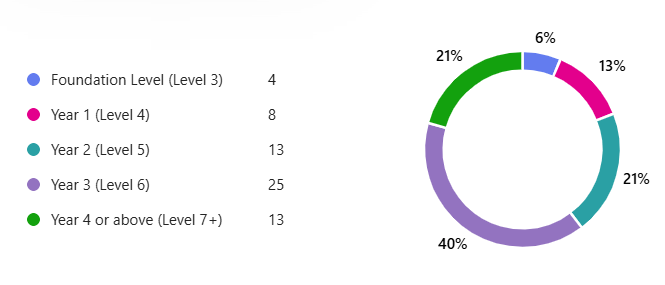
I collected 63 responses across Levels 3–7+. Level 6 was the largest group: 25 respondents, compared with 13 each at Level 5 and Level 7+, eight at Level 4 and four at foundation level.
The results describe this sample, with its strong later-year representation, rather than every undergraduate cohort.
Several disciplines, with an engineering emphasis
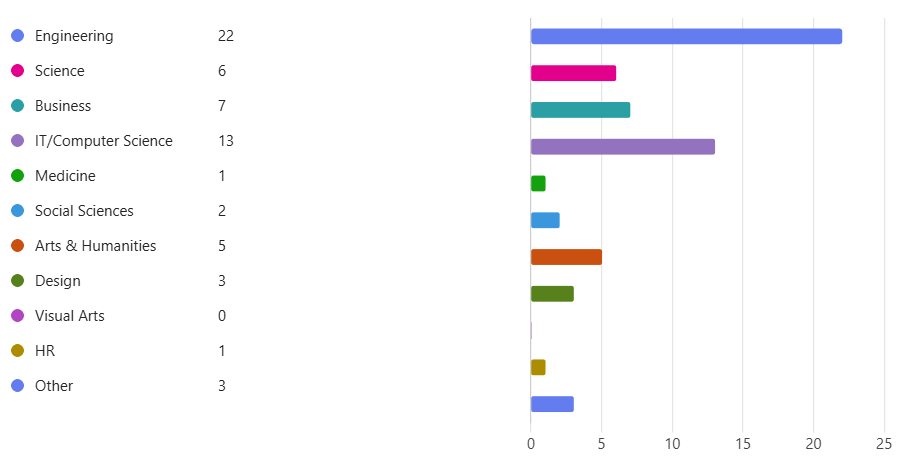
Engineering accounted for 22 responses and IT/Computer Science for 13. Business, Science and Arts & Humanities were also represented, with smaller numbers in other fields.
This broadened the questionnaire beyond the observed glider team, while leaving engineering-related courses particularly prominent.
Questionnaire evidence · Figures 7–10
Platform use
A mixed platform environment
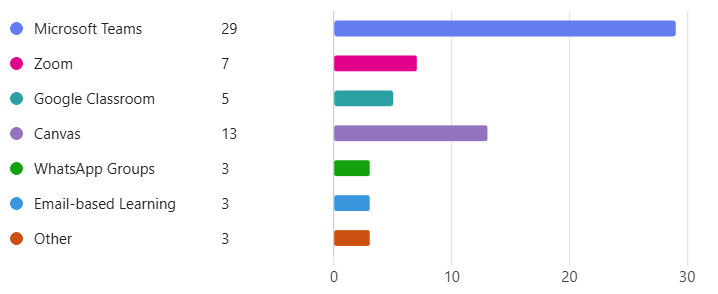
Microsoft Teams was the most frequently selected learning platform, with 29 responses. Canvas received 13, Zoom seven and Google Classroom five; WhatsApp groups, email-based learning and other tools were also reported.
Teams was prominent, but the range of platforms supported the research question about fragmented workflows.
Experience did not mean exclusive adoption
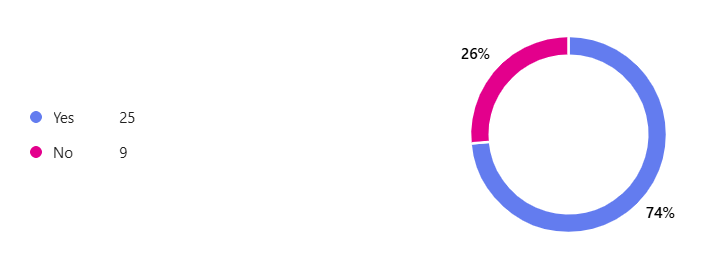
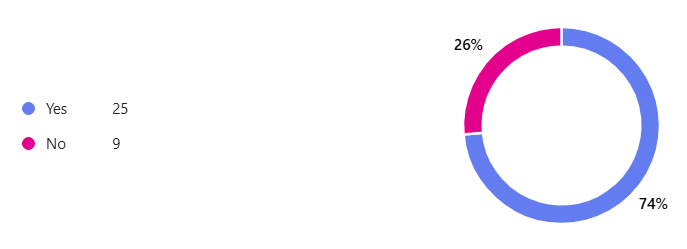
The prior-use chart recorded 25 yes responses and nine no responses: approximately 74% of the 34 answers shown. This is the base for this question, not 74% of all 63 survey participants.
Prior experience provided a starting point for exploring adoption; it did not establish that Teams was a student's sole academic platform.
Use was often intermittent
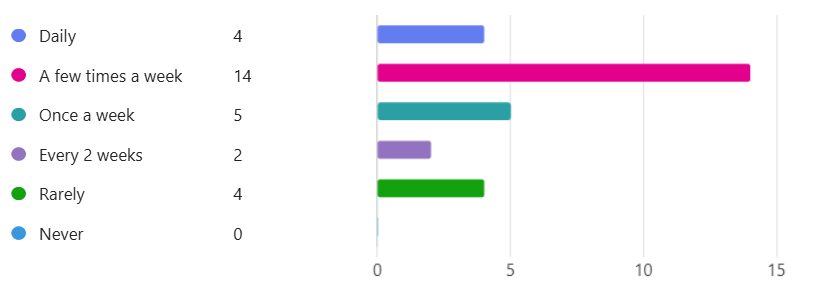
The most common frequency was a few times a week, with 14 responses. Five reported weekly use, four daily use, four rare use and two use every two weeks.
An available platform was not necessarily embedded in daily study routines. The proposed model therefore needed useful recurring entry points.
Structured activities dominated
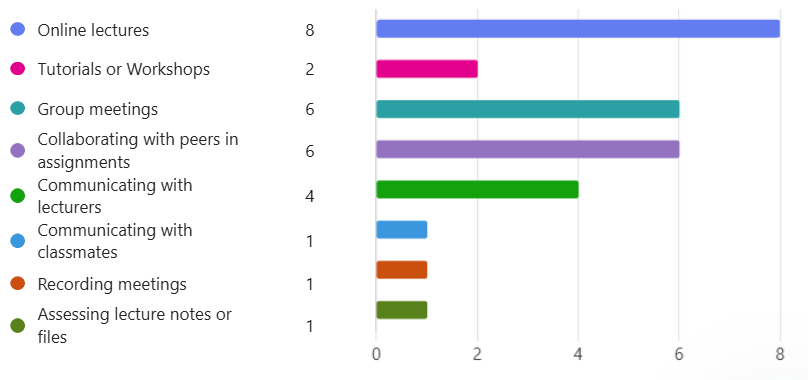
Online lectures received eight responses; group meetings and assignment collaboration each received six. Communicating with classmates received one response, while communication with lecturers received four.
This suggested a distinction between formal academic activity and everyday peer conversation, later explored through interviews and observation.
Questionnaire evidence · Figures 11–14
Experience and preference
Existing platforms already met many needs
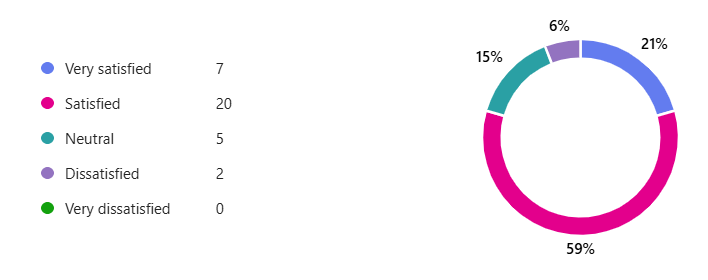
The satisfaction chart showed 20 satisfied and seven very satisfied responses, alongside five neutral and two dissatisfied responses. The displayed percentages were 59% and 21% for the two positive categories.
An integrated model needed to address specific problems rather than assume students were dissatisfied with every existing tool.
Ease of use and familiarity mattered
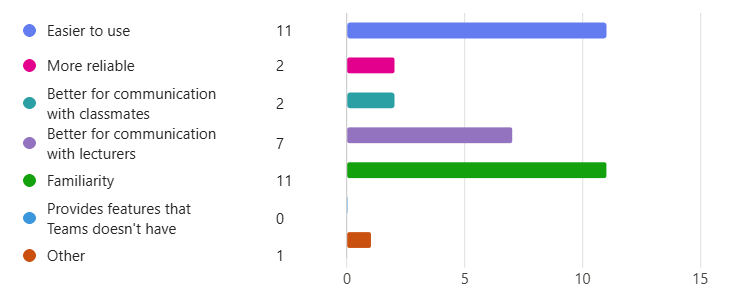
Ease of use and familiarity each received 11 responses as reasons for preferring other platforms. Better communication with lecturers received seven; the option about features unavailable in Teams received no responses.
The findings directed attention towards the experience of using the system, including guidance and predictable organisation.
Habit competed with available capability
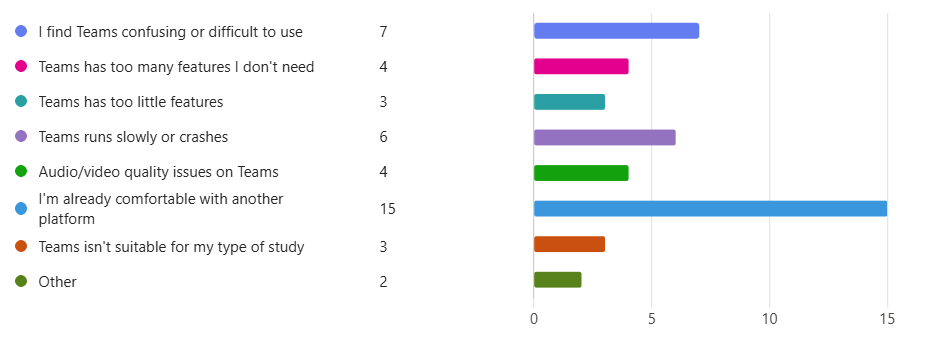
Being comfortable with another platform received 15 responses. Seven found Teams confusing or difficult, six reported slow operation or crashes, and other answers concerned features, audio/video and suitability for their course.
The proposed structure addressed navigation and familiar routines, while recognising that configuration alone would not resolve performance problems.
Perceptions were mixed
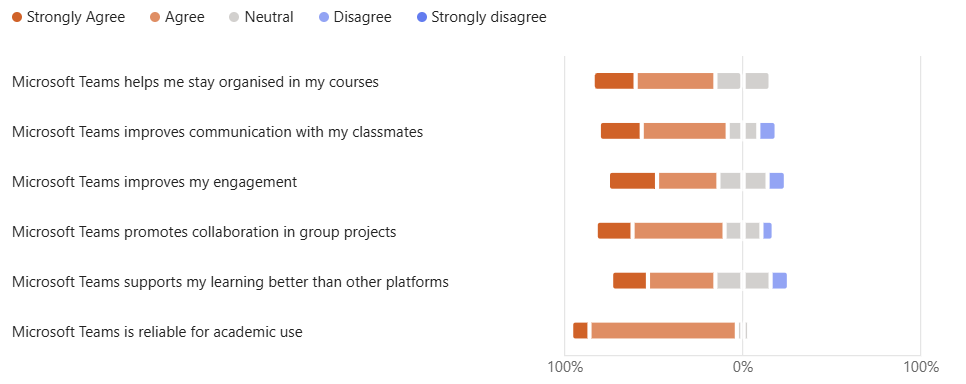
The Likert-style figure compared perceptions of organisation, communication, engagement, collaboration, learning support and suitability for academic use. I interpreted the responses as recognition of benefits that were not consistently experienced in practice.
I carried this qualified assessment into the model rather than treating a single positive perception as proof of improved learning.
Questionnaire evidence · Figures 15–17
Barriers to effective use
The problem extended beyond one application
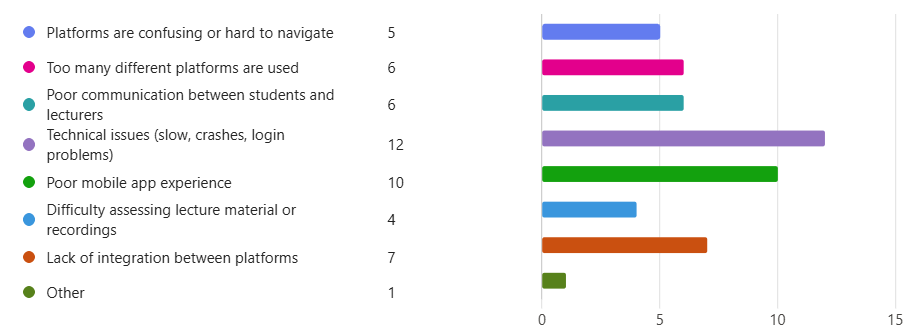
Technical issues received 12 responses and poor mobile experience ten. Limited integration, the use of multiple platforms, communication problems and difficulties locating materials were also reported.
The model needed to reduce avoidable searching and switching without claiming to remove every technical or institutional constraint.
Teams had practical usability barriers
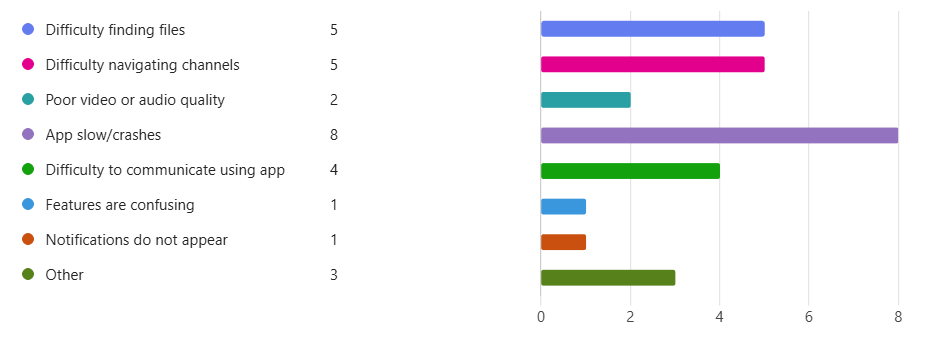
The Teams-specific chart recorded eight responses for slow operation or crashes, five each for finding files and navigating channels, and four for difficulty communicating through the app.
Clear channels, purposeful tabs and topic-based files became practical parts of the proposed response to these reported difficulties.
Formal training was uncommon
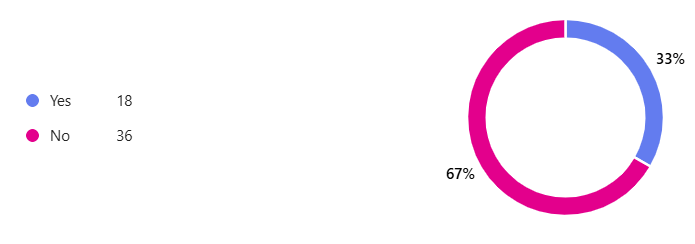
Of the 54 answers shown in the training chart, 36 reported no formal training and 18 reported training: 67% and 33% respectively.
I recommended introductory and follow-up support. The survey suggested a relationship worth addressing, but did not prove that lack of training caused the other reported problems.
Questionnaire evidence · Figures 18–19
Potential for a central workspace
Interest in a more integrated approach
The centralised-platform question showed 25 positive and nine negative responses, approximately 74% and 26% of the 34 answers displayed.
This expressed perceived value, not a measured improvement. It supported exploring an integrated model that could subsequently be tested.
Organisation was the strongest request
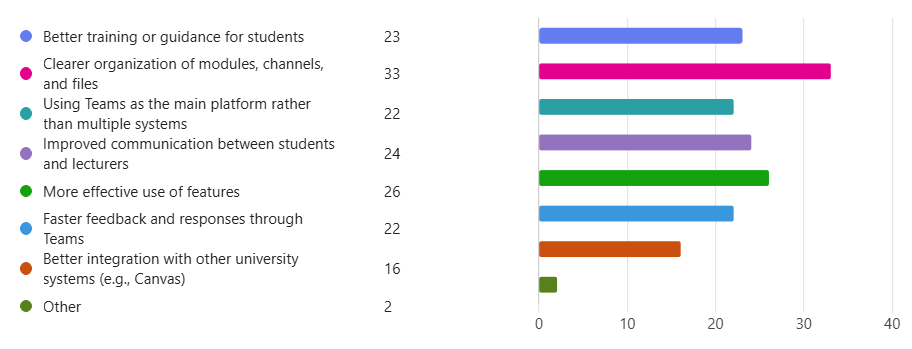
Clearer organisation of modules, channels and files received 33 responses. More effective feature use received 26, improved communication 24 and better guidance 23. Primary-platform use, faster feedback and integration with university systems were also requested.
These priorities became the model's structure, communication choices and training recommendations.
05Interviews & Observation
Why a useful platform was not always the preferred workspace
The interviews explained behaviour that the questionnaire alone could not. Participants valued shared files and organised academic work, but often preferred familiar messaging tools for quick exchanges. Their views were not uniform: positive experiences coexisted with frustrations about navigation, speed of communication and engagement.
Formal and informal communication
Participants distinguished structured academic work from everyday conversation. Teams supported organised material and formal exchanges, while WhatsApp often felt quicker and more familiar. Threaded discussion did not suit every interaction.
Documents and coordination
Shared files reduced the need to exchange separate versions and gave participants a common working location. Some coordination and deadline management nevertheless remained outside Teams.
Habit and attention
Familiarity influenced platform choice. One participant had disabled notifications, illustrating how individual settings and routines could affect communication independently of the workspace structure.
Participation remained a human issue
Participants did not attribute all collaboration problems to software. Unequal participation could reflect individual engagement; simply adding a tool would not ensure that every member used it.
“The main reason is habit.”
Interview participant 1, on using other platforms alongside Teams.
“equal participation depended more on individual engagement rather than the platform itself.”
Interview participant 3, on group participation.
The observed glider workspace made this distinction tangible. The group adopted shared report and presentation documents, but several other available features did not become part of its routine.
Direct observation · Figures 20–22
The intended workspace and the workspace in use
Channels existed; behaviour stayed in General
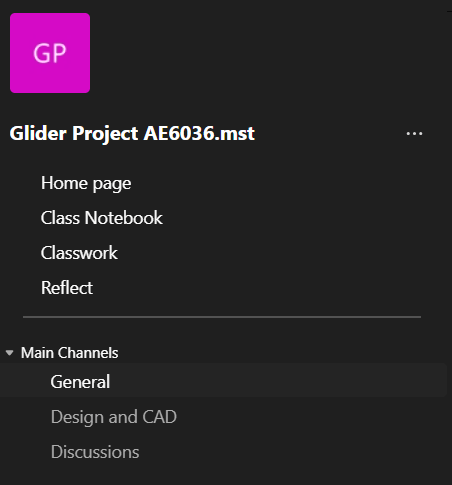
I observed a six-member undergraduate glider project, including myself. General was created for announcements, Design & CAD for file submissions, and Discussions for communication. Most interactions nevertheless remained in General.
Providing a structure did not guarantee that the group would adopt it. The proposed model needed guidance on how each space should be used.
Shared documents became part of the workflow
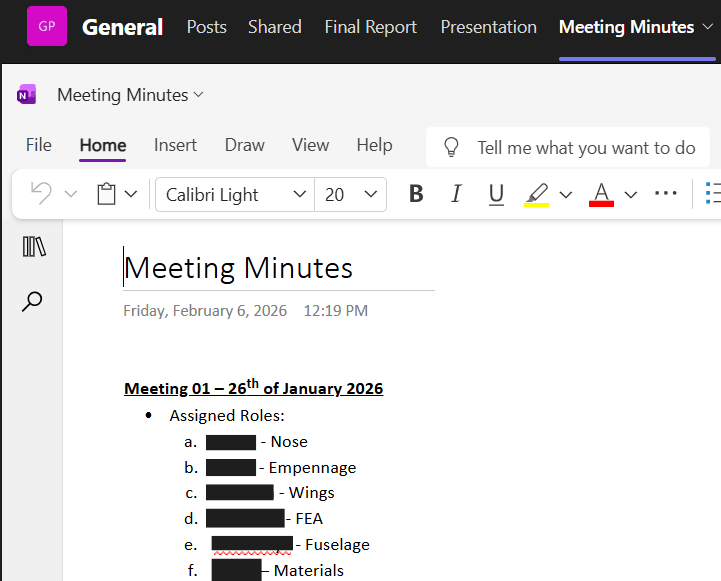
The workspace included a shared Word report, a PowerPoint presentation, OneNote meeting minutes and a Planner-based Schedule tab. Report and Presentation were used extensively, whereas Schedule and Whiteboard were not actively used.
The model retained the successful document tabs but treated wider tool adoption as something requiring introduction and support.

Meeting records depended on individual use
I used OneNote to record meeting minutes, but this did not become a shared group habit. Day-to-day discussion largely continued on WhatsApp, separating ongoing communication from structured work in Teams.
The minutes provided a structured record, but my individual use did not show that the whole group had adopted the workflow.
06Evidence Synthesis
The gap was between available capability and everyday practice
The evidence pointed towards an implementation problem as well as a technology problem. Students recognised useful capabilities, yet familiarity, unclear organisation, limited guidance and practical difficulties shaped what they actually used.
Retain what already worked
The observed use of shared Word and PowerPoint documents supported keeping those tools prominent in the proposed group workspace.
Address retrieval and navigation
Requests for clearer organisation and difficulties finding files informed consistent channels, topic-based resources and purposeful tabs.
Support adoption rather than assume it
Low reported training and unused project tools informed workshops, lecturer guidance and examples of effective practice.
Respect different communication needs
The preference for quick informal messaging informed a distinction between structured posts and chat. Whether this would change established habits remained an open question.
07Proposed Teams Model
A structured Teams environment for modules and group work
I translated the findings into a proposed model built around a consistent module workspace and dedicated group channels. The aim was to give each activity a clear location while allowing project teams to adapt the details to their work.
The following walkthrough uses original still screenshots from the proposed model, Figures 23–50. It demonstrates configuration and intended workflows, not a live institutional deployment or a recorded user trial.
Proposed model · Figure 23
A module-level hub with dedicated group spaces
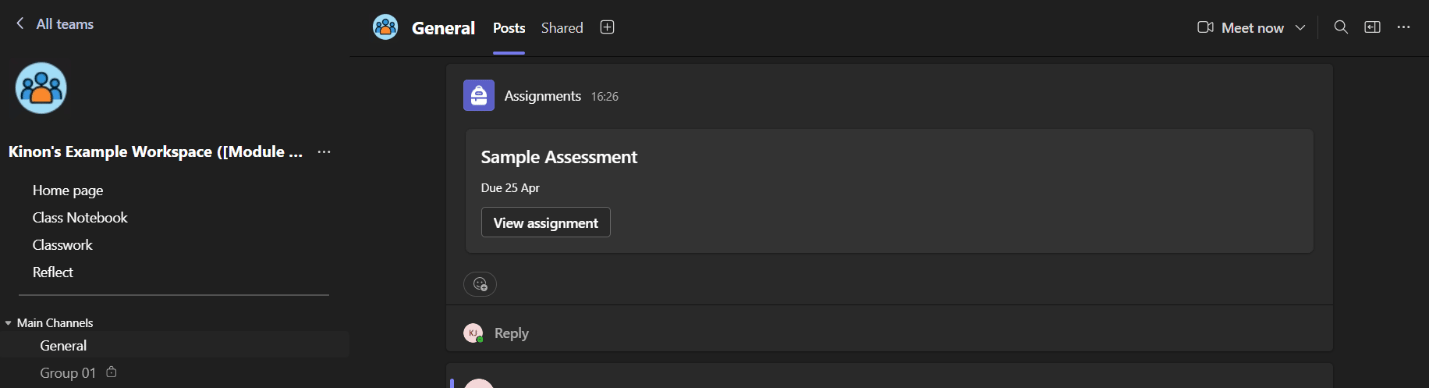
One Team for each university module
I proposed a consistent module-level Team with General for lecturer announcements and module communication, alongside private channels for assessed groups. Each group would have its own collaboration space within the wider module environment.
The structure aimed to make navigation familiar across modules while keeping group-specific materials within the relevant membership. This was a proposal, not an institution-wide deployment.
The wider capability considered
Alongside the illustrated model, I reviewed the platform capabilities that could support a connected academic environment.
Communication and meetings
Channels and chat, searchable conversation history, scheduled or instant meetings, screen sharing, breakout rooms, recordings and transcription were among the capabilities considered in the dissertation.
Shared work and integrations
The review considered file sharing and co-authoring through Microsoft 365, OneDrive and SharePoint, shared notes, Whiteboard and integrations with Microsoft and third-party tools.
Access across contexts
Multi-device access was relevant to students moving between teaching spaces and independent work. Reported mobile and performance difficulties remained practical constraints.
Accessibility and inclusion
The dissertation discussed live captions, high-contrast options and identity-related features such as pronouns and name pronunciation. These formed part of the wider capability review rather than tested outcomes of the model.
08Module Experience
From the module homepage to learning, assessment and feedback
The module-level experience brought information, teaching resources and structured communication into a predictable environment. The sequence below follows the proposed student and lecturer workflows rather than presenting an isolated list of features.
Proposed module homepage · Figures 24–25
A useful first screen
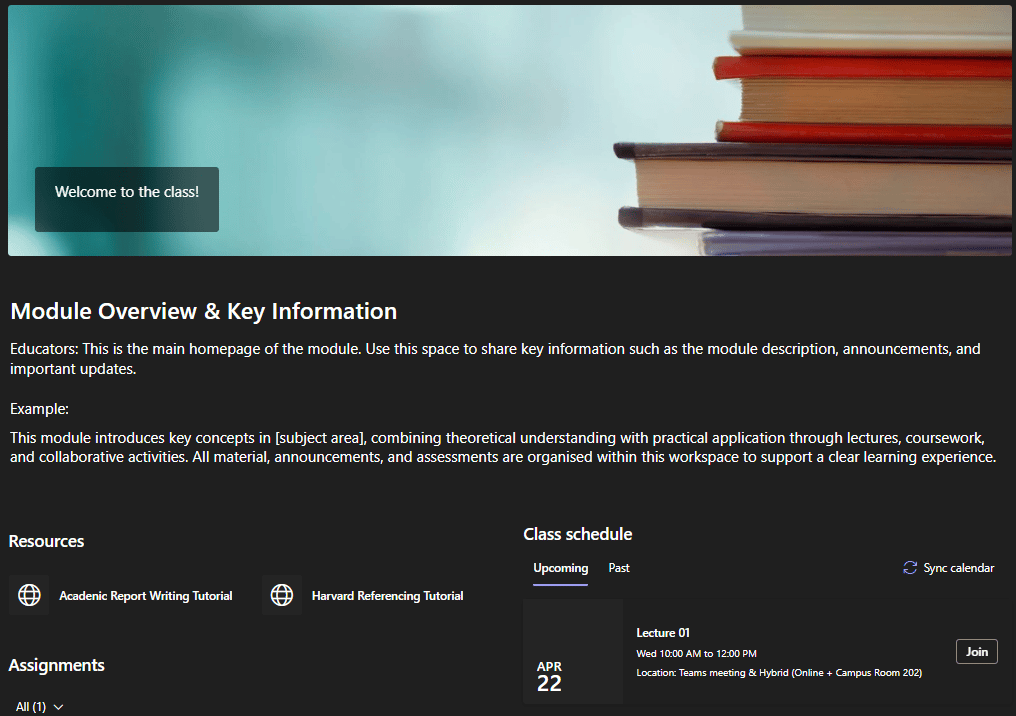
Module context and important information
I proposed a homepage that brought the module description, key announcements and relevant resources into the first screen students opened. Lecturers could include external material such as supporting videos.
A clear starting point responded to the need to find academic information without searching across several systems.
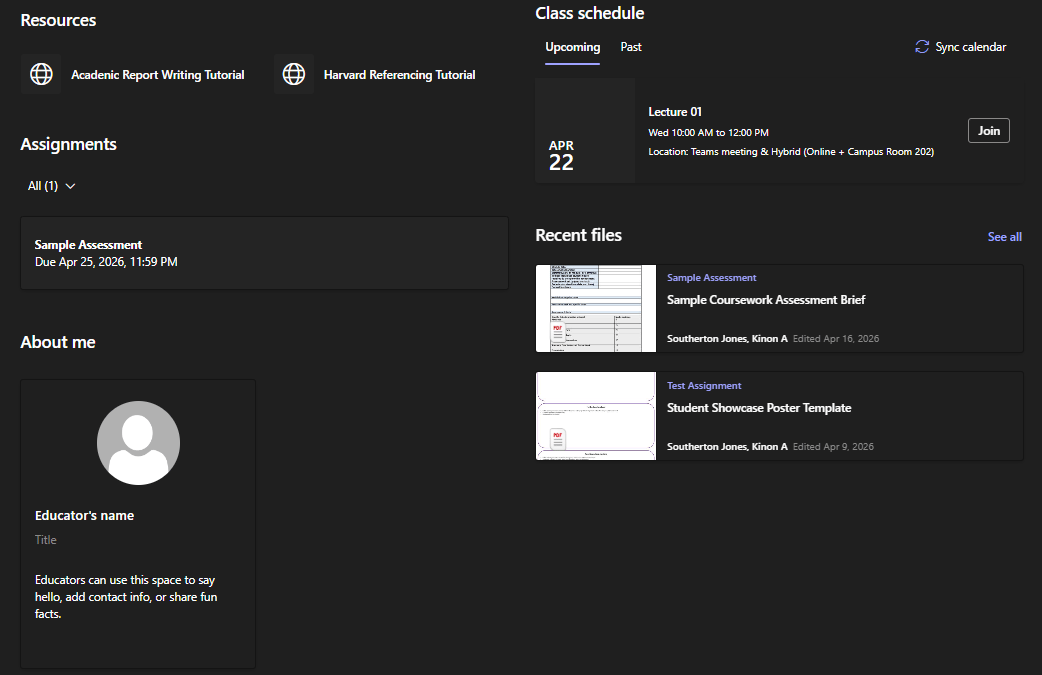
Current information, maintained by the lecturer
The homepage included calendar-synchronised class schedules, recent files and upcoming assignments. Lecturers could customise sections, save and review edits, and publish the revised content when ready.
The homepage was intended to bring current information together; institutional compatibility and effectiveness would still need evaluation in a live module.
Proposed teaching and learning spaces · Figures 26–27
Class Notebook
Four areas with different purposes
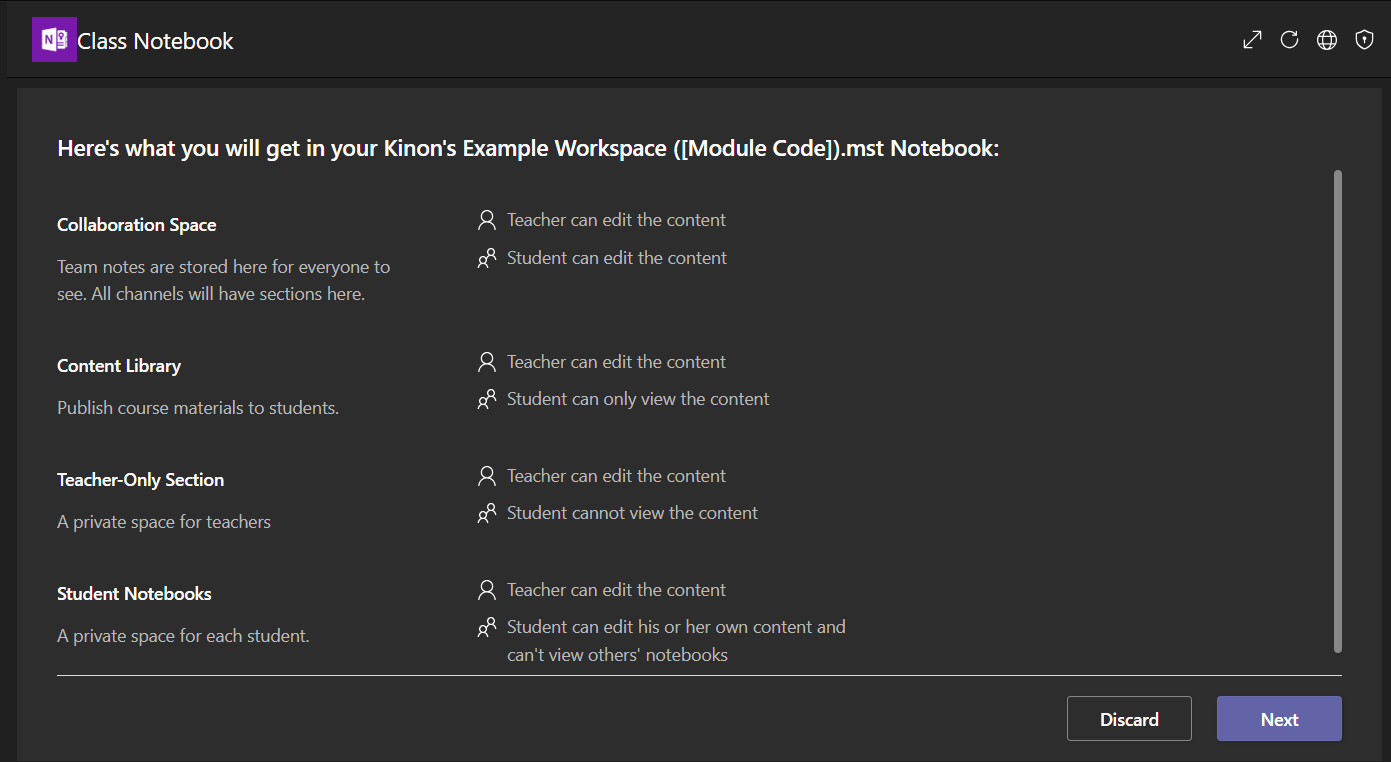
The proposed notebook separated a Content Library for lecturer material, a Collaboration Space for shared work, a teacher-only area and individual student notebooks. Suggested student sections included lecture notes, tutorial work, assignment drafts and personal notes.
Separating these purposes gave students an organised working space alongside the shared module resources.
Work through a problem together
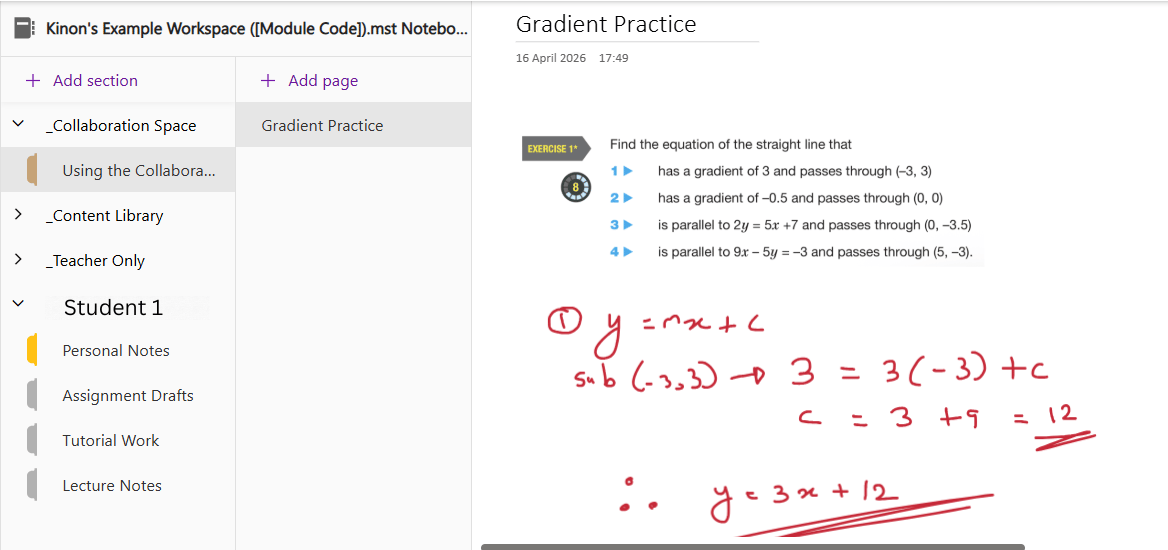
The Collaboration Space could support live teaching: a lecturer could share and solve a problem while students contributed in the same space. The example showed a gradient exercise and handwritten working.
This was a proposed use of a shared notebook, extending the model beyond storing lecture files.
Proposed assessment workflow · Figures 28–31
From assignment setup to feedback
Create and publish
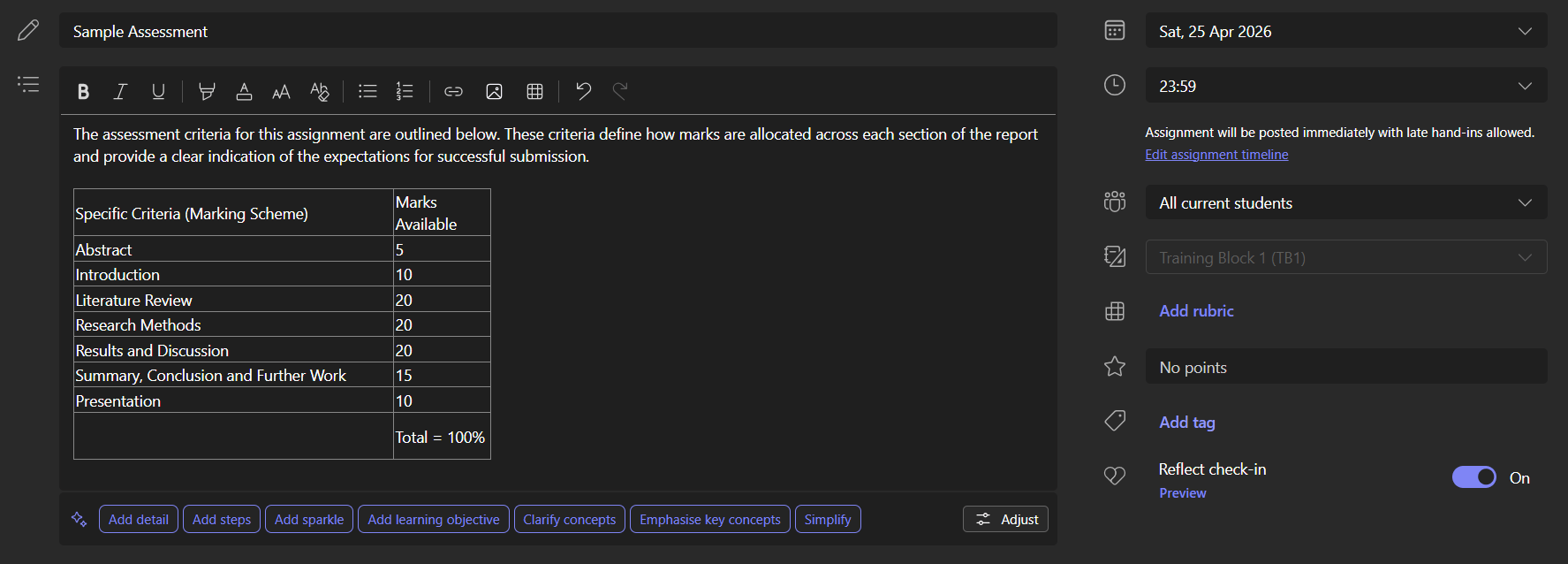
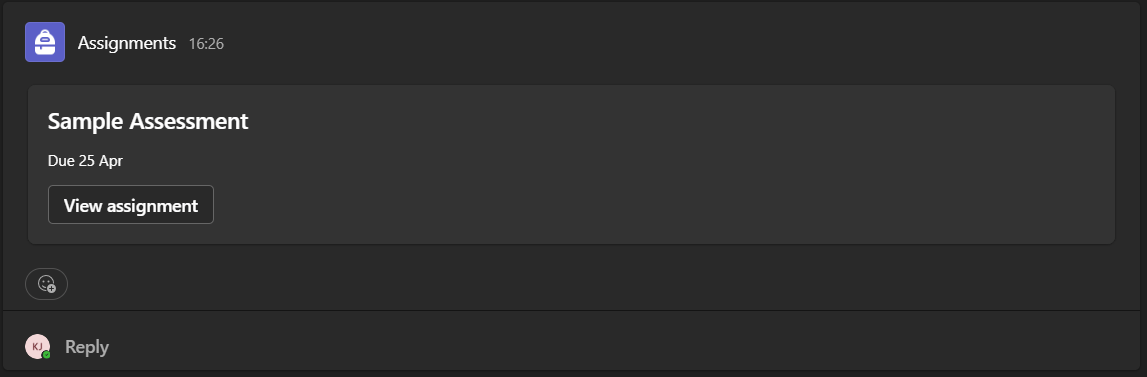
The proposed Classwork workflow let lecturers enter a description, deadline and marks, attach supporting material, and publish immediately or schedule release. Work could be directed to selected students where appropriate.
Clear setup brought the brief, timing and assessment information together. The screenshot is a sample assessment from the proposed environment.
Keep the brief with the task
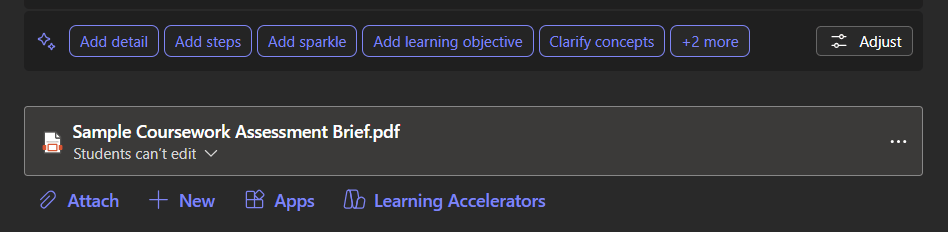
An attached coursework brief and supporting links could remain accessible from the assignment itself rather than being distributed separately.
The design connected the task instructions to the place students would return to when completing the work.
Open, complete and submit
From the student view, the assignment could be opened to read the description and attached brief, then used to submit work. The proposed lecturer workflow included tracking submissions, marking and feedback.
These were model features, not a validated replacement for formal university assessment systems. Institutional requirements would determine the appropriate integration.
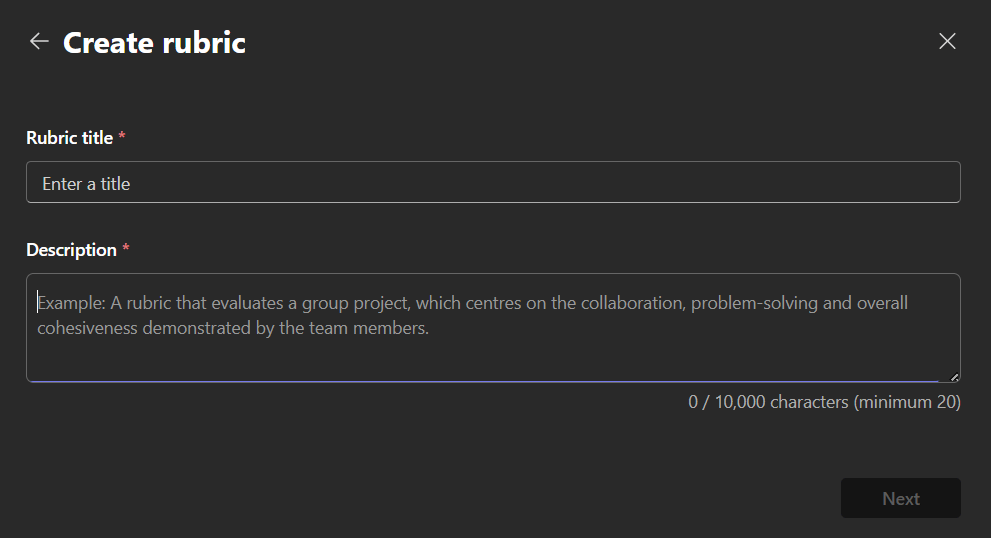
Make assessment criteria visible
The model included a marking rubric to communicate criteria and support feedback within the assignment workflow.
The rubric connected the assessment instructions to how work would be reviewed; the dissertation did not test its effect on student outcomes.
Proposed supporting features · Figures 32–33
Reflect and student wellbeing
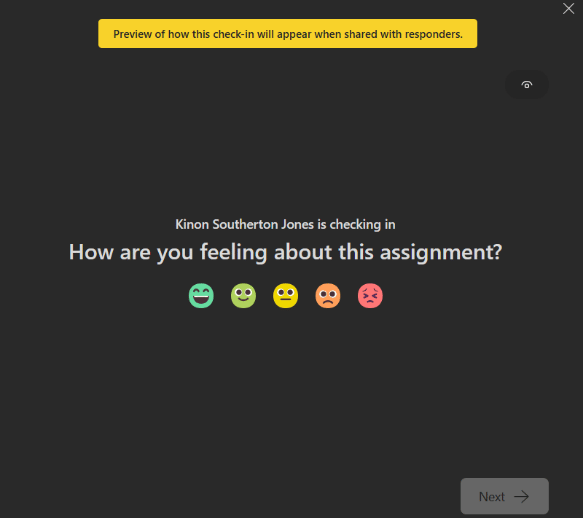
A brief student check-in
Reflect was included as a way to gather student feedback and consider engagement through a short check-in.
It formed one supporting part of the learning environment; the dissertation did not measure wellbeing or engagement improvements from its use.
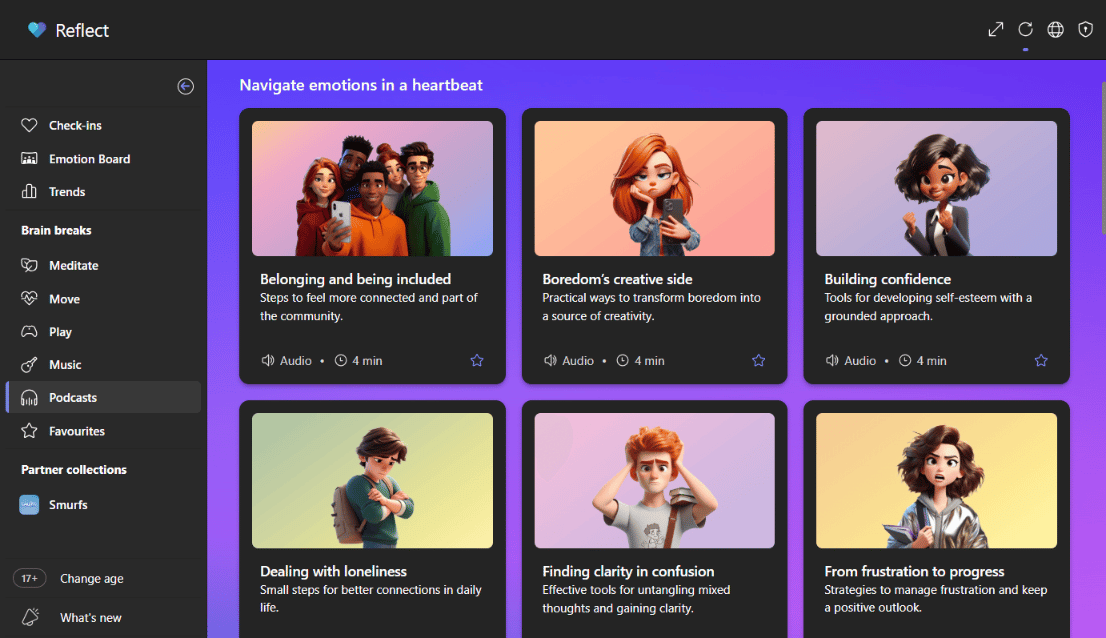
Access to guided resources
The proposed environment also linked to self-growth and wellbeing material, including short podcasts and guided resources described in the dissertation.
This broadened the module's support resources without making wellbeing tools the central purpose of the project.
Proposed posts workflow · Figures 34–36
Structured module communication
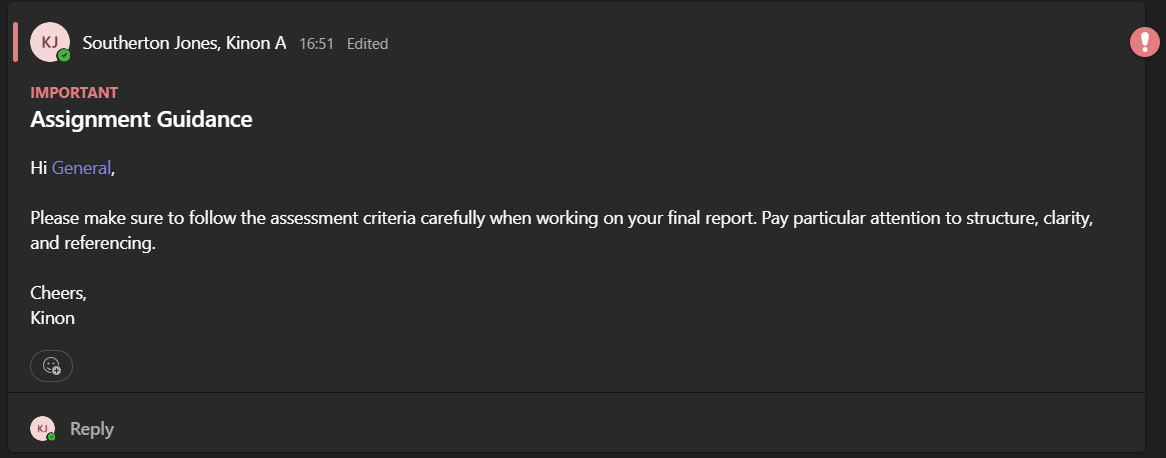
Posts with a clear audience
Lecturers could use standard posts and formatted messages for module communication. Channel mentions could address the class, individual mentions could direct attention to specific students, and important-message emphasis could distinguish urgent information.
The intention was to make formal communication easier to organise and revisit; a notification was not a guarantee that every student would engage.
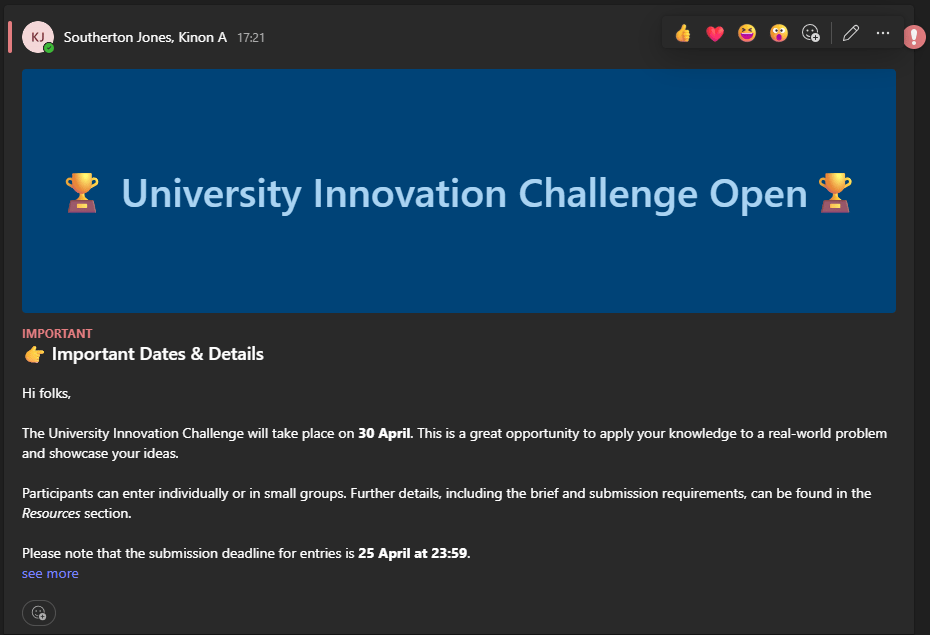
Announcements for prominent updates
Announcement posts offered headings and formatting for significant updates such as deadlines. The proposed example used a clearly structured announcement rather than another undifferentiated message.
This gave module-level notices a more deliberate presentation while retaining the General channel as their shared location.
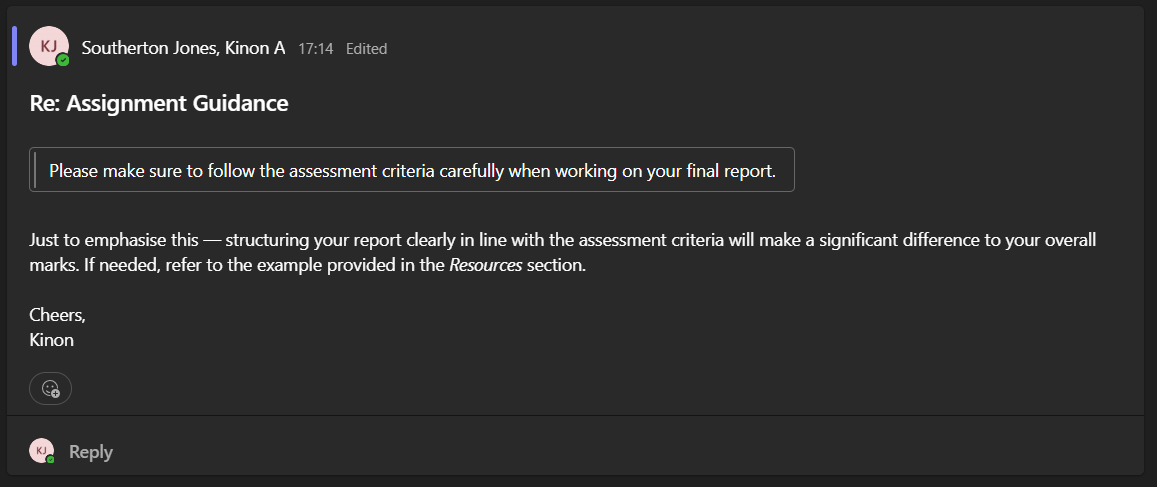
Update and reference earlier information
Posts could be edited after publication, and quoted replies could refer back to the message being discussed.
This supported traceable formal discussion. The model separately included informal chat because threaded posts did not suit every conversation.
Proposed resource organisation · Figures 37–39
Learning materials and meetings
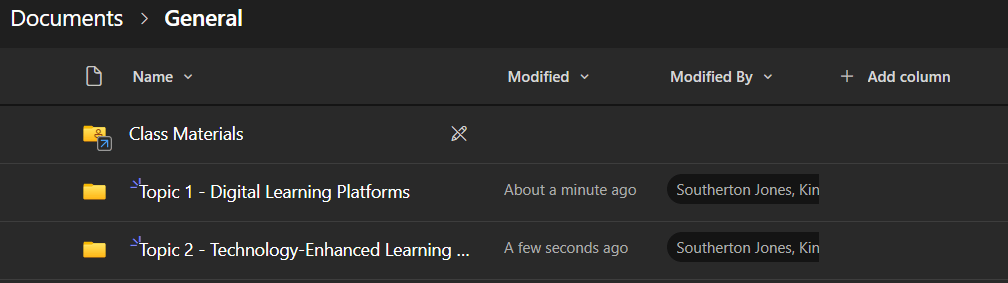
Organise around the topic
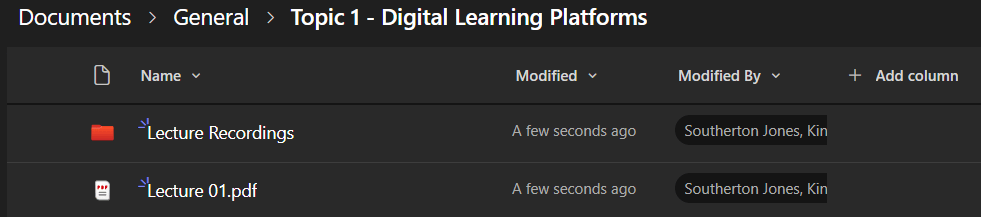
I proposed topic-based folders in the Shared tab so students could use the subject being studied as the organising principle for resources.
The structure addressed reported difficulties with finding files and inconsistent organisation across learning environments.
Keep related materials together
Each topic folder could hold lecture slides, supporting PDFs or documents, and a subfolder for lecture recordings. Scheduled Teams meetings could support teaching, with recordings and transcripts available for later review as described in the dissertation.
Students would have a consistent place to revisit the material for a topic instead of reconstructing it from several locations.
Support retrieval as well as storage
Search and filtering complemented the folder structure. The illustrated tools included media-type and location-related ways to find material and files shared in messages.
A clear filing system and retrieval tools were complementary parts of the proposed response to navigation problems.

09Group Collaboration
A shared working environment for the project team
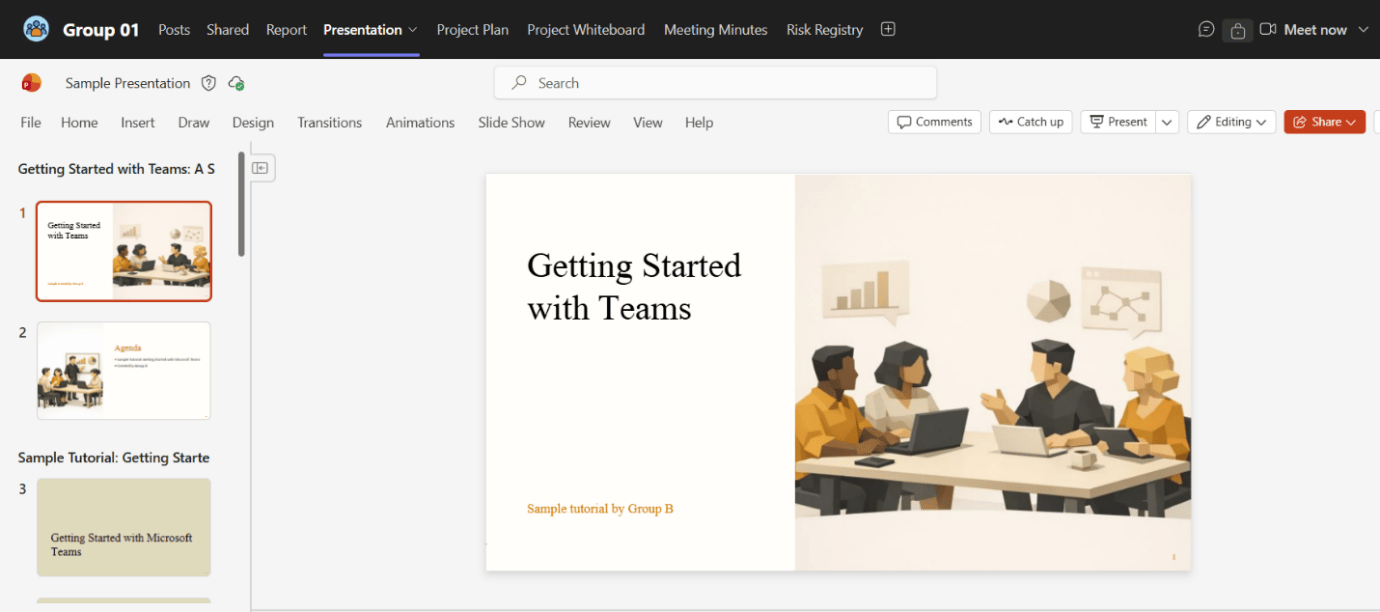
The group model extended the module structure into the work of an assessed team: organising evidence, co-authoring outputs, allocating tasks, recording decisions and maintaining project risks.
These tools had different evidential foundations. Shared documents had been used extensively in the observed group; wider use of Planner, Whiteboard and meeting records was proposed as a better-supported workflow.
Proposed group structure · Figures 40–42
A private project workspace
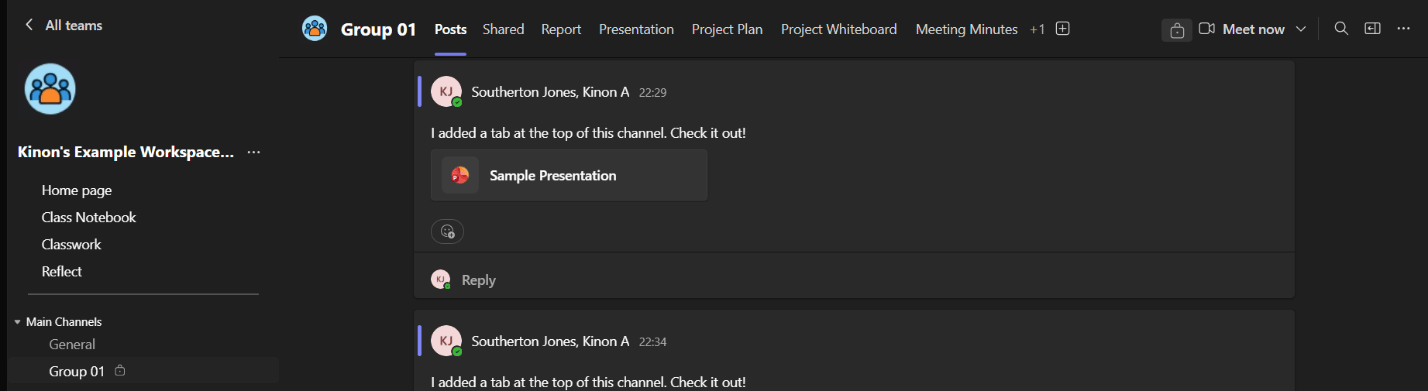
Keep assessed group work together
Each assessment group would receive a private channel for its conversations, files and integrated tools. Group-specific work would sit within the module structure without being shared with unrelated student groups.
This connected the module-level framework to a dedicated space for the practical work of each team.
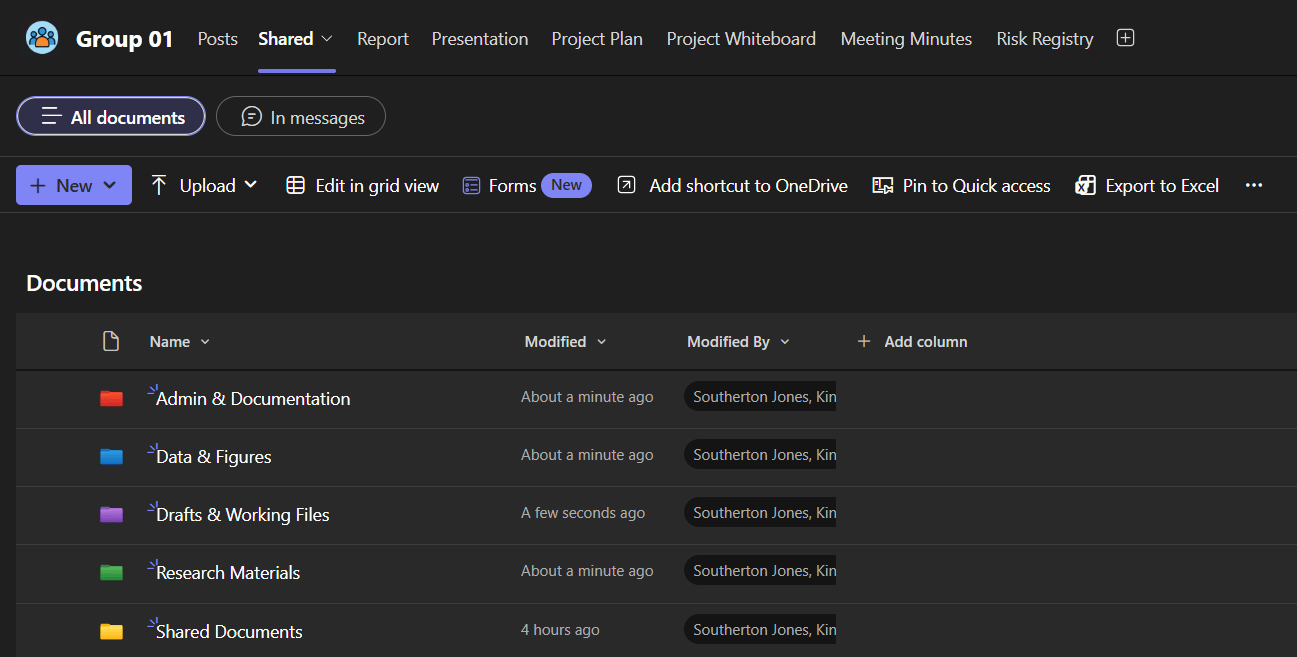
A file structure that can be adapted
The suggested folders were Admin & Documentation for briefs and guidelines; Data & Figures for outputs; Drafts & Working Files for work in progress; and Research Materials for sources and references.
I proposed a general starting framework, with flexibility for the requirements of different projects rather than a mandatory folder structure for every assignment.
Bring the working tools into view
The workspace tabs linked to the report, presentation, project plan, Whiteboard, meeting minutes and risk register alongside posts and shared files.
The tabs made the working environment explicit. Their usefulness still depended on students understanding and adopting them.

Proposed co-authoring workflow · Figures 43–44
Shared documents with one working location
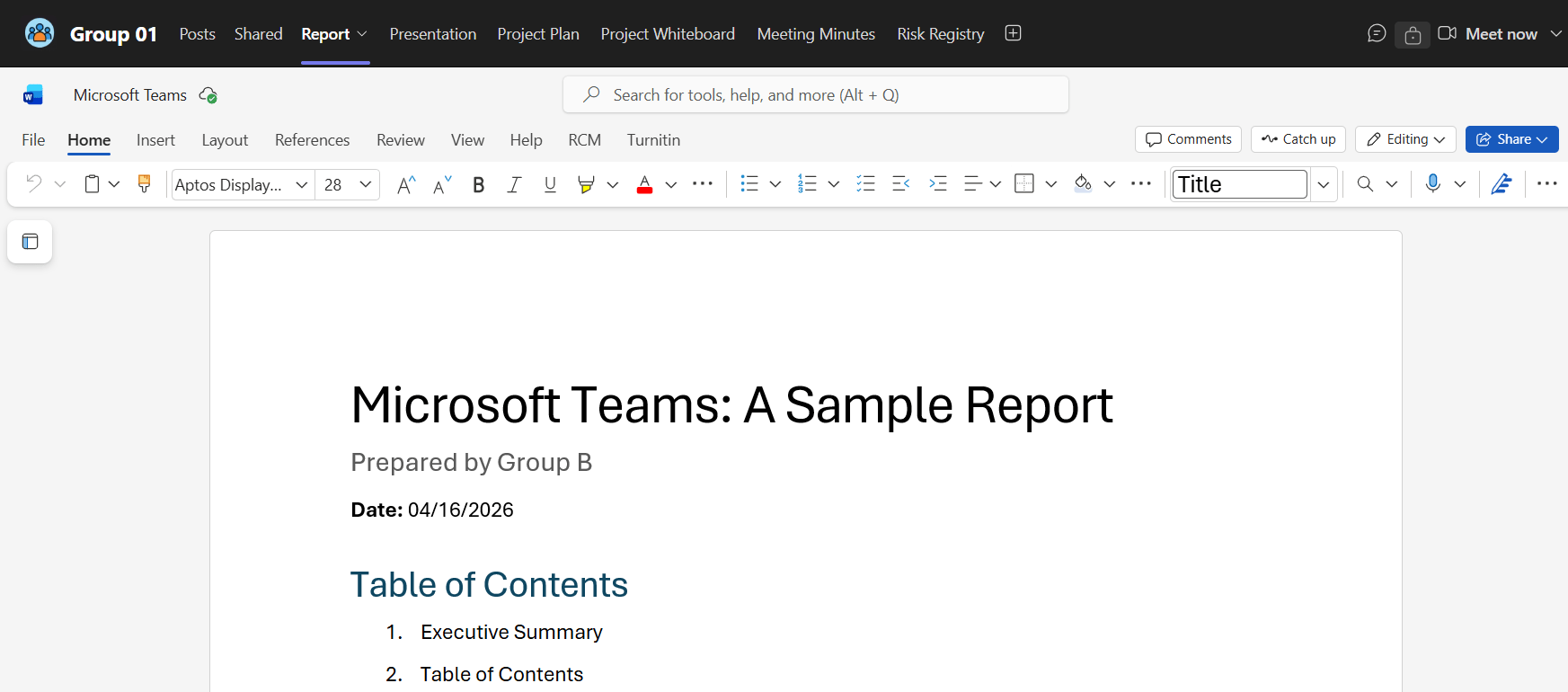
Work on the report together
A Word report could be added directly as a tab so several students could work in the same document, with the current file accessible from the group environment.
This built on the observed success of the shared Report tab and aimed to reduce conflicting copies of the same work.
Keep the presentation alongside the report
A shared PowerPoint tab provided the same common working location for the presentation, allowing students to edit it collaboratively.
Report and Presentation were among the features used extensively in the observed project, giving these recommendations a direct connection to the evidence.
Proposed project tools · Figures 45–48
Coordinate tasks and retain decisions
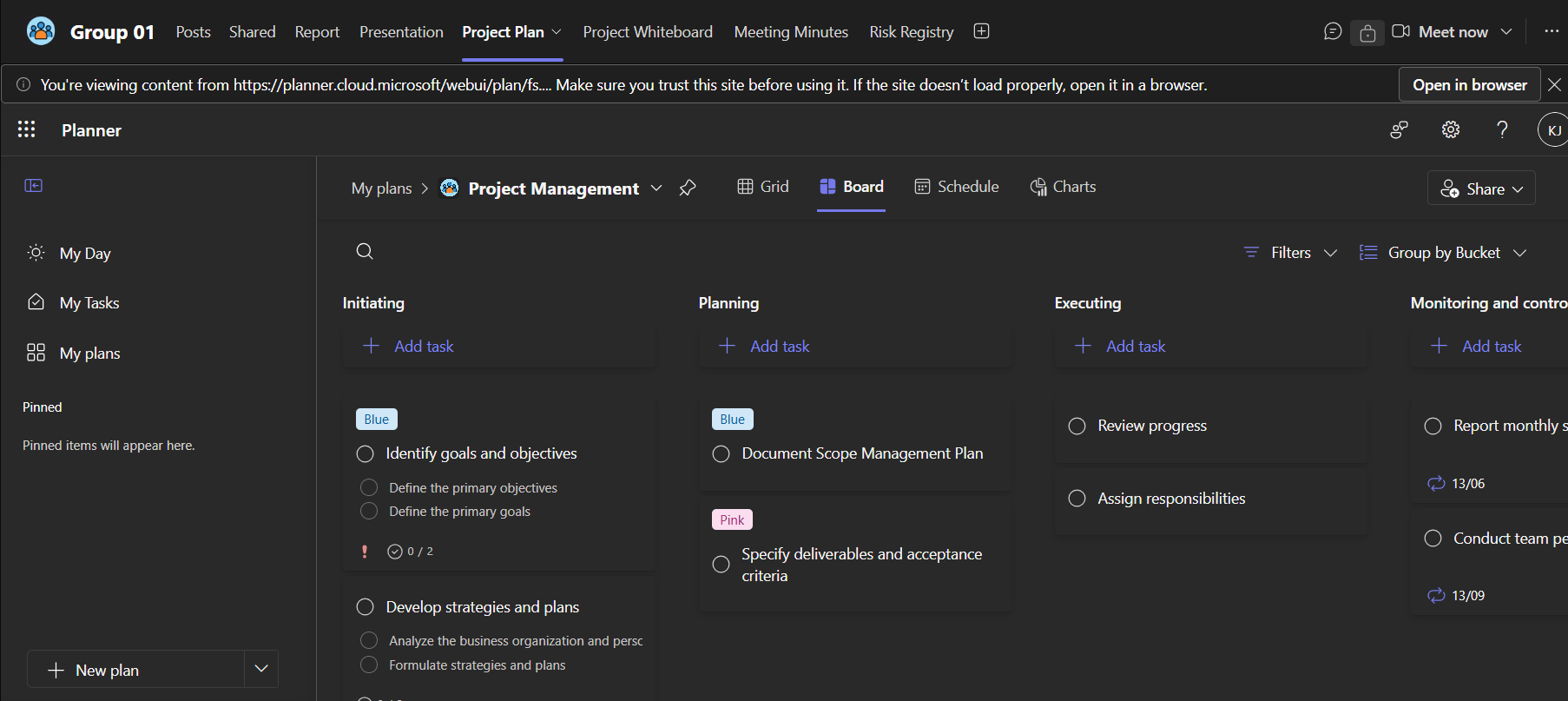
Planner for responsibility and progress
The proposed Planner workflow covered creating tasks, assigning responsibilities, setting deadlines and monitoring progress.
The observed Schedule tab was not actively used. This was a recommendation for better-supported adoption, not a claim that Planner had already solved the group's coordination problems.
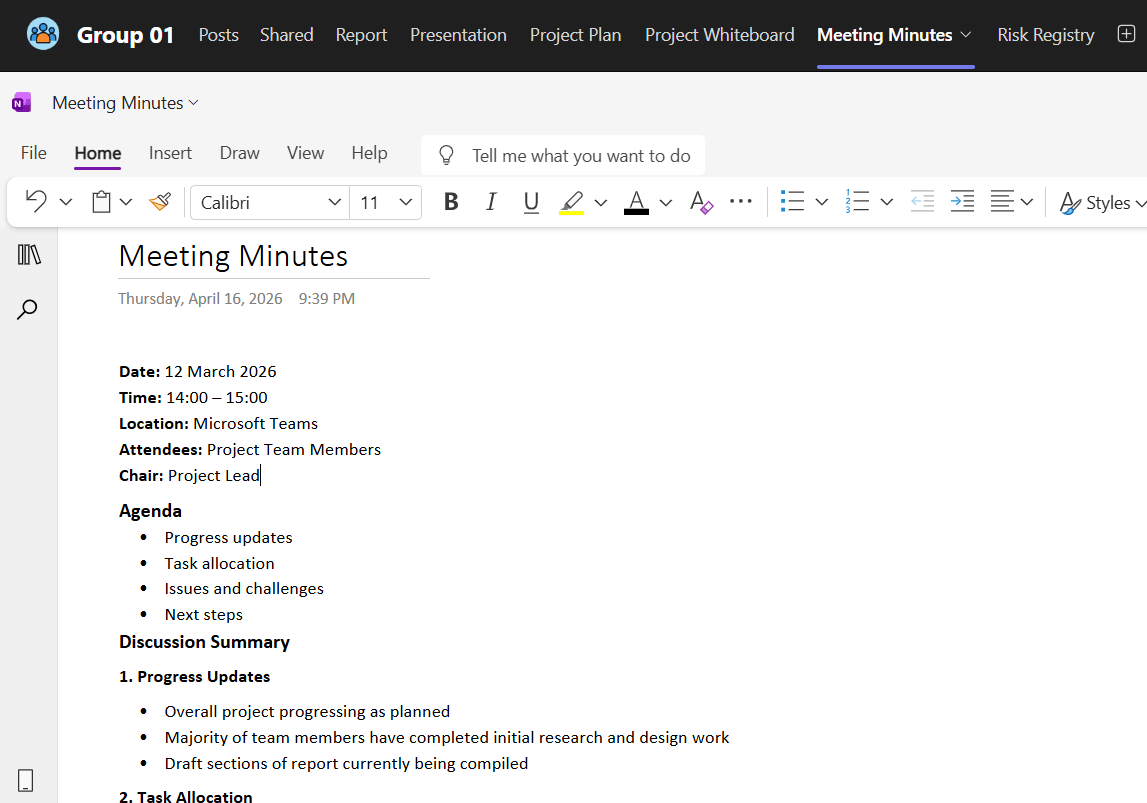
OneNote for meeting continuity
OneNote could hold agendas, discussion summaries and structured meeting records. The example organised progress updates, task allocation, issues and next steps in a common place.
I had used OneNote individually during the observed project. The model proposed making meeting records part of the wider group's routine.
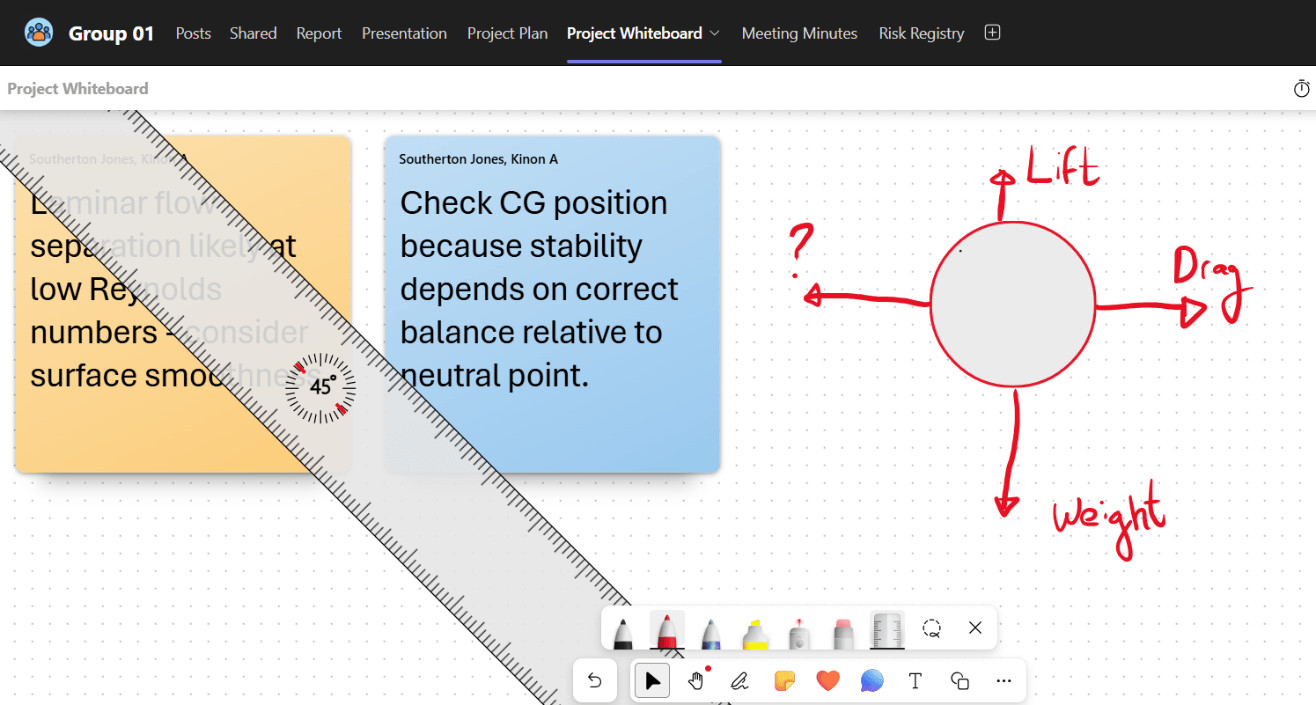
Whiteboard for visual discussion
Microsoft Whiteboard was included for brainstorming and developing ideas during meetings. The example used sketches, notes and shared visual working.
This was a proposed collaborative activity; Whiteboard had not been actively used in the observed glider workspace.
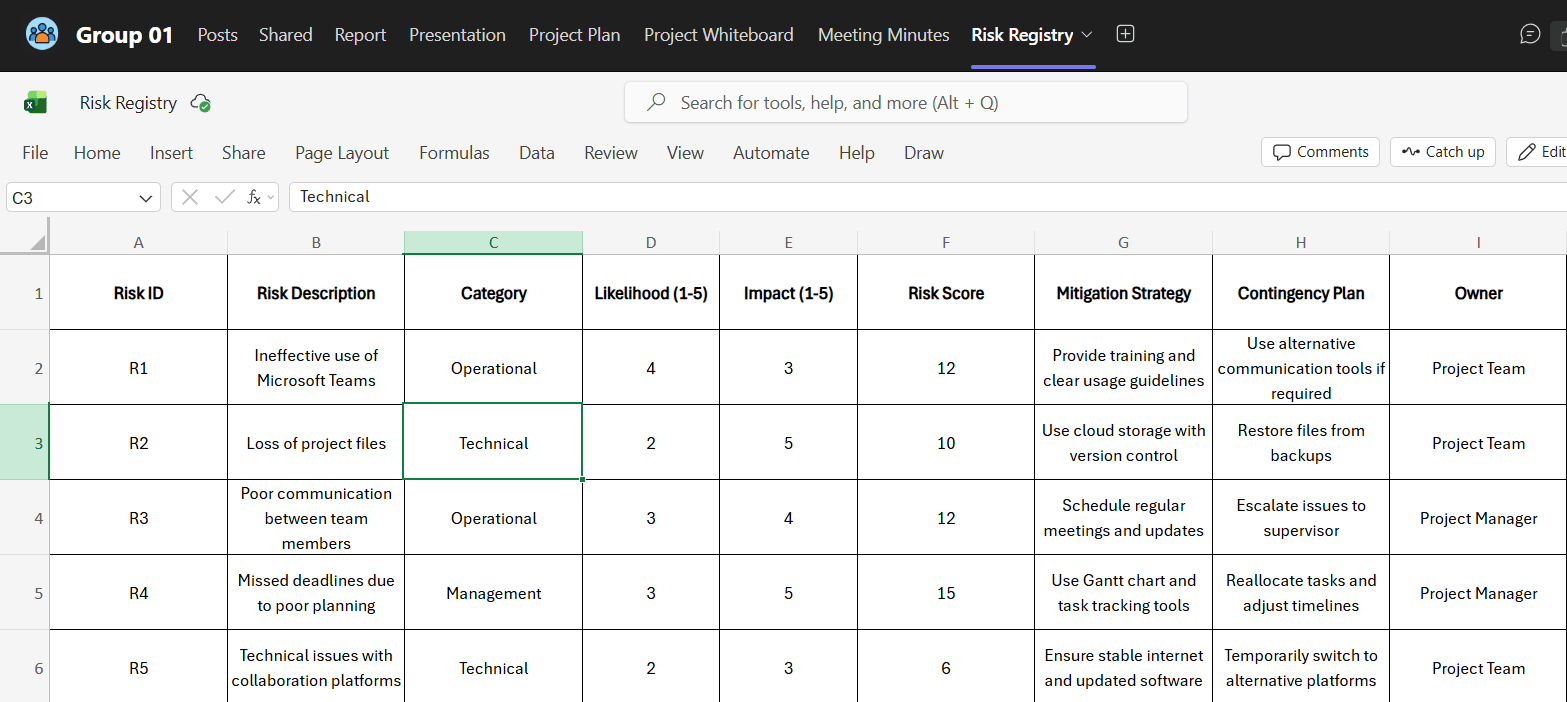
An Excel-based risk register
The proposed register recorded risk descriptions, categories, likelihood, impact, risk scores, mitigation, contingency actions and ownership within an Excel sheet opened from the workspace.
This was an integrated spreadsheet for project teams to maintain, not a specialised native Teams risk-management system or evidence that the sample risks had been resolved.
Proposed chat and personalisation · Figures 49–50
Make room for informal interaction
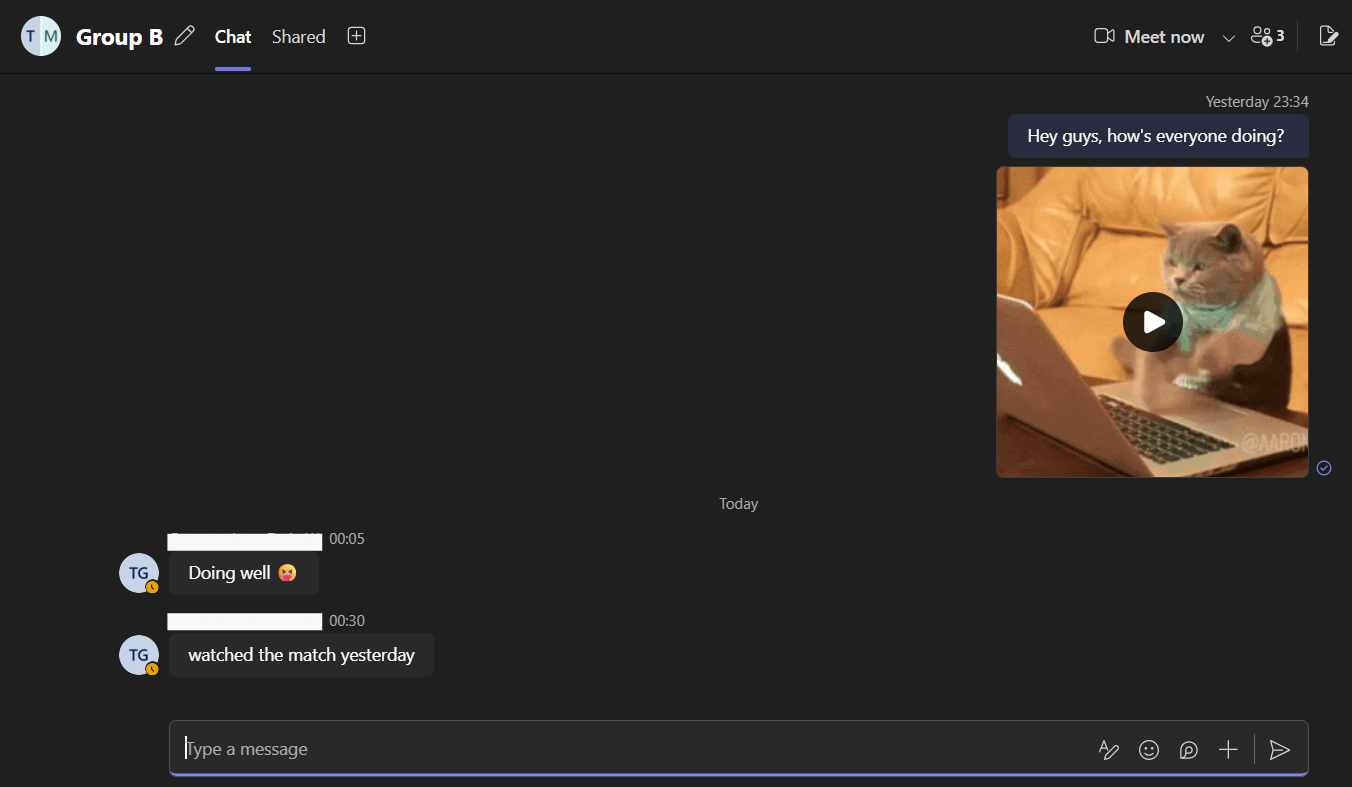
Chat for quick exchanges
The model included Teams chat as a messaging-style space for informal discussion and direct communication, alongside formal channel posts.
This responded to participants' preference for quick WhatsApp exchanges. It did not establish that Teams chat would replace those habits; that would need testing with students.
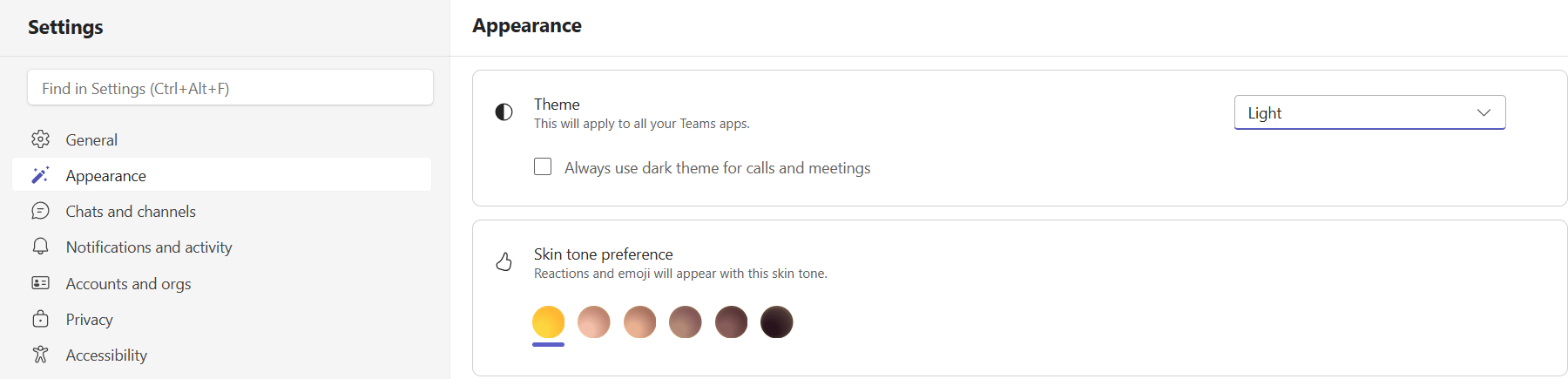
A more personal interface
The walkthrough included theme and appearance settings as options for adjusting the workspace experience.
This addressed feedback about a rigid or dull interface at the level of a proposal. Personalisation alone was not presented as a proven route to better engagement.
10Implementation
A workspace needs an implementation approach, not just a template
I recommended coordinated support for institutions, lecturers and students. Consistency would establish a recognisable starting point, while training and flexibility would help groups use the workspace for their actual tasks.
01 · Establish the structure
Set a consistent module framework
Use a General channel for module communication, private channels for group work, clear tabs and organised files. Provide staff guidelines and review the structure periodically so consistency is maintained.
02 · Support teaching staff
Combine functionality with effective module design
Provide lecturer training on teaching, assessment and workspace organisation. Example templates and practical guidance would support consistent use rather than leave each lecturer to configure the environment independently.
03 · Introduce student workflows
Demonstrate, practise and reinforce
Run introductory workshops at the start of a degree and follow-up sessions. Demonstrate well-structured module and group spaces, including good examples from previous students with appropriate credit.
04 · Encourage meaningful adoption
Connect use to the work students are doing
Explain the professional relevance of collaborative working. The dissertation also proposed possible assessment credit for evidenced effective use and optional small competitions with modest prizes. These were recommendations for consideration, not implemented policies or tested incentives.
05 · Preserve flexibility
Allow the framework to fit the project
Encourage groups to adapt the tools and structure to their requirements. A common template should establish a useful foundation without requiring identical workflows for every assignment.
11Limitations & Further Work
What the study could establish—and what still needed testing
The research developed an evidence-informed proposal. Its scale, sampling and evaluation limits constrained the conclusions that could be drawn about broader adoption or measurable educational outcomes.
Sample and setting
The questionnaire was relatively small and used convenience sampling. Interviews and observation centred on one engineering group, limiting how far the findings could be generalised to other courses or universities.
Researcher involvement
I was a member of the observed project. This provided access to real working practices, but introduced the possibility of bias in what I noticed and how I interpreted it.
Perceptions and outcomes
Questionnaire and interview evidence reflected individual experiences and perceptions. It did not establish that a particular configuration caused improved attainment, productivity or engagement.
Model evaluation
The proposed model was not tested over a sustained period in a real module. Its effectiveness, adoption and compatibility with institutional systems remained to be evaluated.
Further work
A larger study across courses and universities would provide a broader evidence base. Applying the model within a live module and evaluating it over time would test the proposed workflows in practice. Further investigation of lecturer perspectives and integration with university systems would also be needed.
12Conclusion & Reflection
Research translated into a practical system proposal
I completed an individual dissertation that connected a literature review, questionnaire analysis, interviews and direct observation to a detailed Teams model and implementation recommendations.
The central conclusion was that available functionality alone did not determine effective use. Organisation, guidance, established habits and the way tools fitted academic work were central to the implementation challenge.
This work developed my approach to defining a problem, gathering complementary evidence, analysing user needs and translating findings into a structured proposal. It also required me to distinguish a plausible design response from a demonstrated result, and to identify what a subsequent evaluation would need to address.
Source: Kinon Jones, Optimising the Use of Microsoft Teams in Undergraduate Education, final-year dissertation, April 2026. Figures 5–50 are reproduced from the supplied dissertation, with their original numbering. Conceptual diagrams on this page summarise the research process and proposed structure.